TeklifAl Product Tour Try it free
A product tour with real screens

Procurement on one screen, from Excel list to delivery.

TeklifAl brings it all together: preparing the request for quotation, collecting quotes from suppliers, comparing them line item by line item, and turning your selection into purchase orders you can track. Every screenshot below was taken from the app itself.

7chapters · the end-to-end process
1screen for every quote
0sign-ups required for suppliers
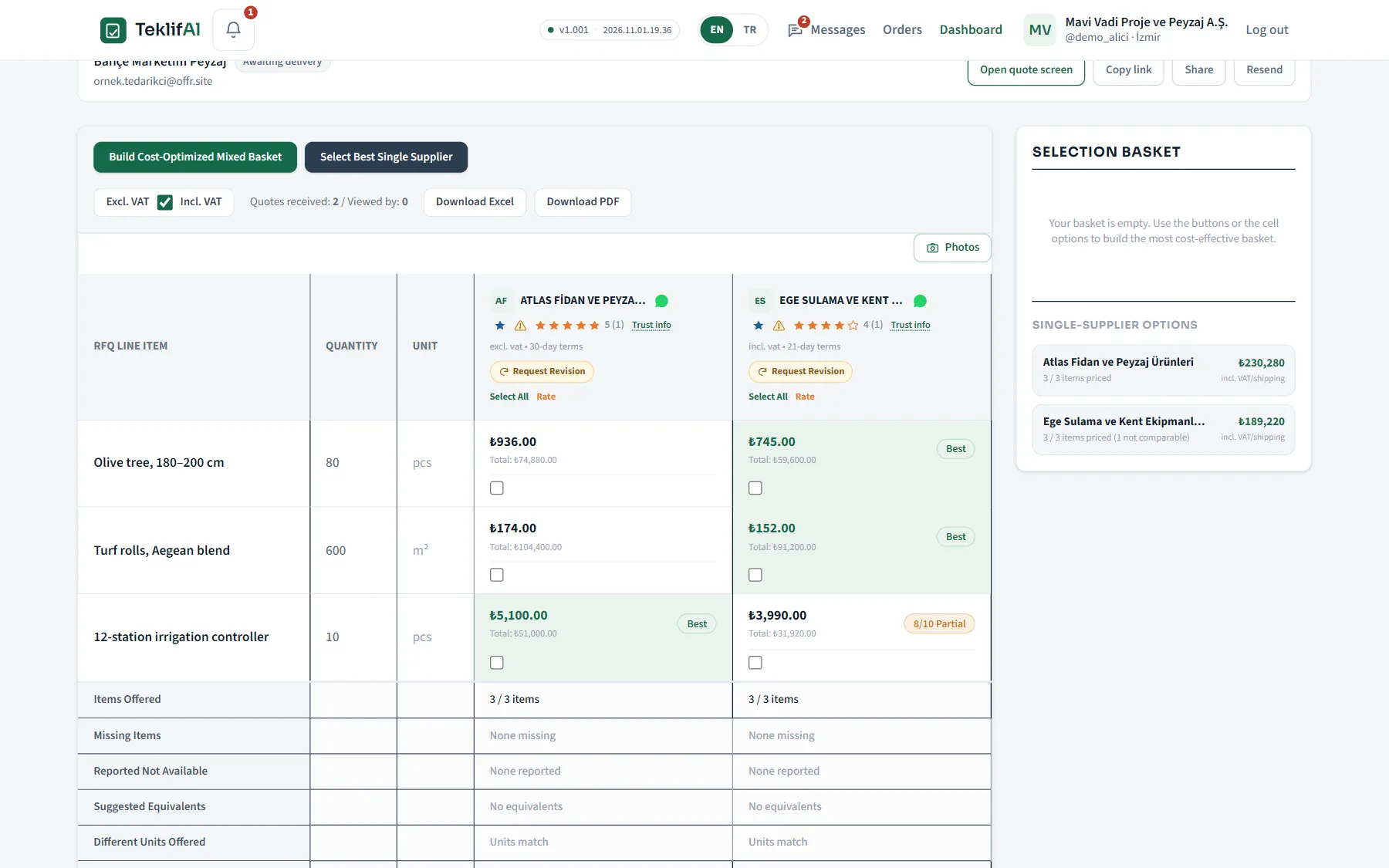
TeklifAl quote comparison matrix
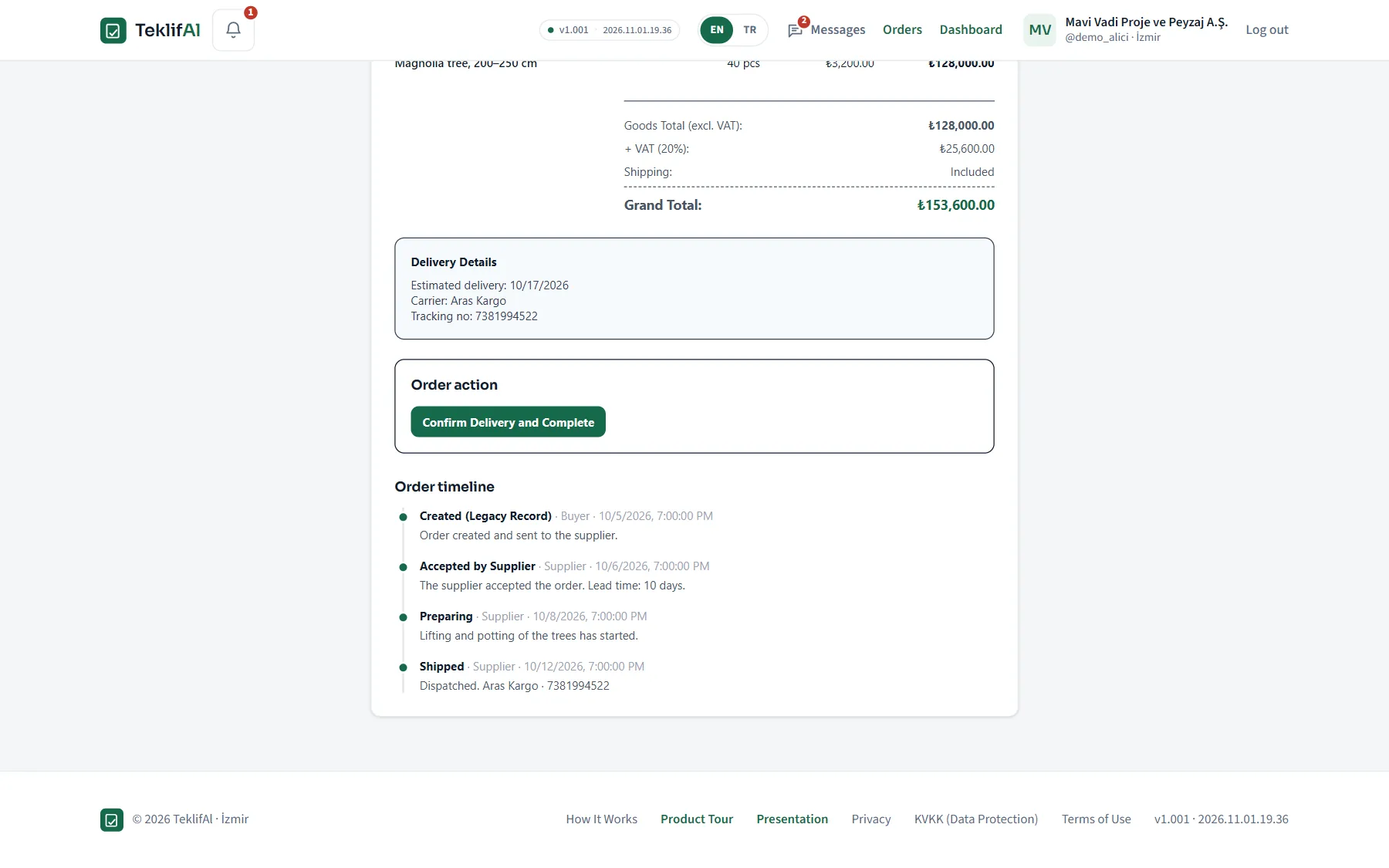
Purchase order timeline
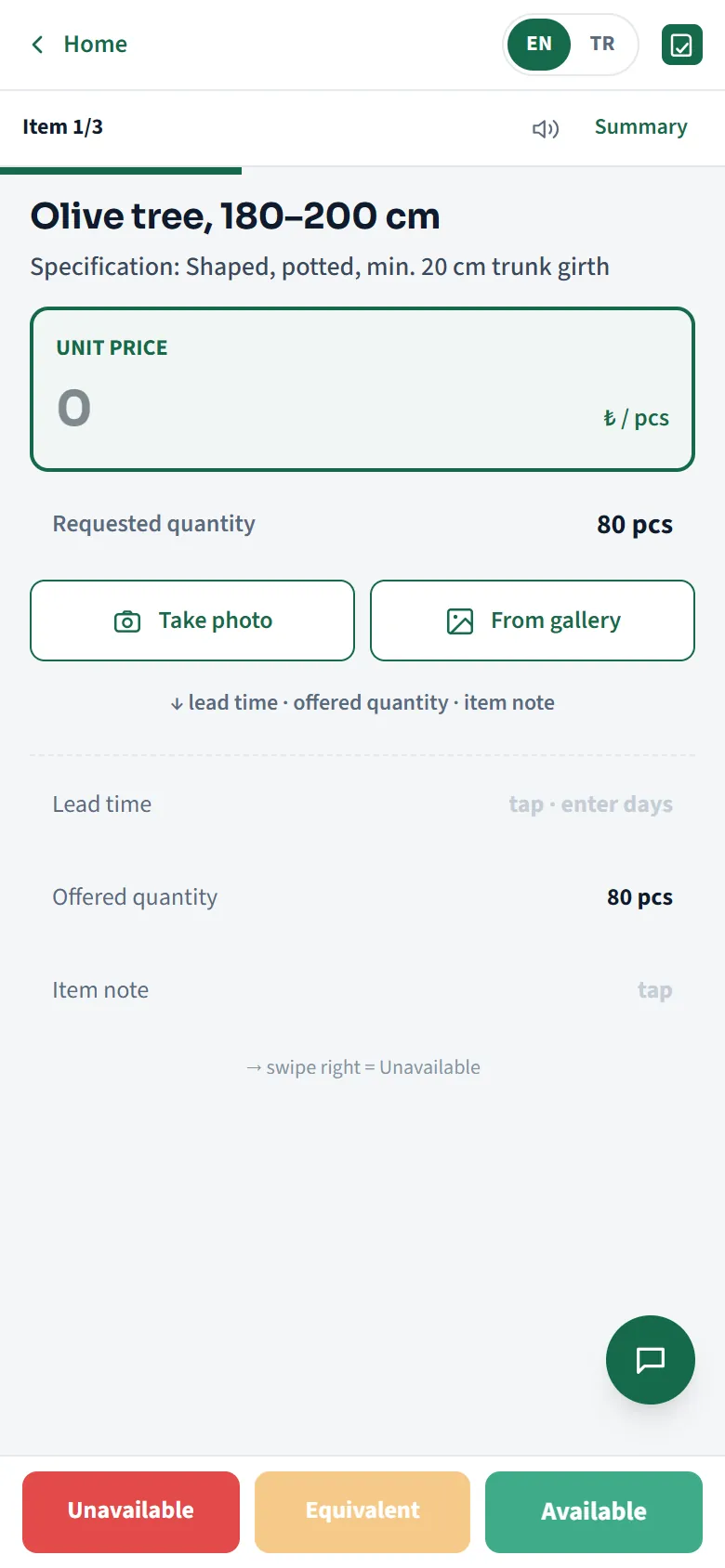
Mobile quoting screen
1

Prepare your request for quotation in minutes

The Excel list you already have is your RFQ. Upload it, map the columns, and the request is ready.

Step 01

Upload your Excel list

No need to key in products one by one. Upload the list you already have and let TeklifAl map the columns.

  • Upload Excel, enter items manually or paste from the clipboard
  • In the column-mapping step, you tell it what each column means
  • Download the sample template and prepare your own list to match
Step 02

Attach specifications and files to the request

Alongside product specs, quantities and delivery expectations, your project files become part of the request too.

  • Specifications, drawings, photos and project files — suppliers download them from the quoting screen
  • Keep the request invite-only or publish it openly
  • For recurring needs, copy it in seconds with “Create again from this request”
2

Work with your own suppliers — and reach new ones

The companies you work with stay yours. TeklifAl helps you manage them without losing track, and add new ones when you need to.

Step 01

Build your own supplier directory

Group companies, tag their product categories and keep notes for yourself. Everything is ready for your next request.

  • Notes like “gives 8% off on bulk orders” stay private to you
  • On the request screen, invite suppliers from your directory or a whole group at once
  • Jump straight to a call, email or WhatsApp from the saved contact details
Step 02

Invite suppliers — or open it to everyone

Each supplier gets a personal invite link. You can send it over WhatsApp, and the supplier quotes without creating an account.

  • Invite your existing suppliers to quote by email
  • Bring in suppliers on the platform who sell in the matching category
  • See on the request itself whether each invite was opened and whether a quote came in
Step 03

The supplier’s side of the story

Suppliers tick the categories they sell and get notified when a request opens in that category. They can also browse open tenders without waiting for a direct invite.

  • Category selection → automatic emails and notifications for matching requests
  • Open tenders are listed under “Discover”
  • They can add requests to a watchlist and never miss a quote deadline
3

Make quoting easy for your suppliers

This is where TeklifAl really stands out: order for the buyer, speed for the supplier. A supplier out on site prices your request line item by line item, right from their phone.

Step 01

From a phone, no account or password needed

The invite link opens the pricing form directly. The supplier enters their company and contact details and submits the quote.

  • Reviews the specs of each line item and prices them one by one
  • Clearly flags products they can’t supply as “Not available”
  • Suggests equivalent products and uploads product photos
Step 02

A clear summary before sending

The total updates as prices are entered. The supplier confirms with a clear view of exactly what they’re sending — no room for misunderstandings.

  • Can save the quote as a draft and finish it later
  • Signed-in suppliers can reuse their own past prices
  • Can decline an invite they can’t quote on, with a reason
Step 03

A receipt to keep after sending

Suppliers can always go back and see which price they gave for each line item, and which version they sent.

  • Recorded together with its version number
  • If the buyer asks for a revision, they update it from the same screen
4

Compare the whole quote, not just the price

The cheapest-looking quote isn’t always the best one. Quantities, VAT, shipping and equivalents sit in the same table.

Step 01

Every quote on one screen, line item by line item

Suppliers’ quotes line up side by side in columns. Quotes given in a different unit, incomplete or partial quotes are all flagged.

  • Line items that are offered, missing or marked “not available” are summarised in separate rows
  • Suggested equivalents and product photos right inside the cell
  • If one supplier quoted including VAT and another excluding it, TeklifAl puts them on the same footing
Step 02

Buy from one supplier, or split the basket

You can even split a single line item: 8 units from one supplier, the remaining 2 from another. The decision is always yours.

  • The “Cost-Optimised Mixed Basket” makes a recommendation that also factors in shipping and VAT
  • Single-supplier alternatives sit right next to it — you choose
  • You don’t have to accept the recommendation; you can also tick cells by hand
5

Handle revisions and conversations in one place

Don’t let negotiations get lost in WhatsApp. Revision requests, quote versions and messages all stay on the request.

Step 01

Request a revision for the whole quote or a single line item

Your request reaches the supplier as a notification; when the new version arrives, it sits side by side with the old one.

  • Version 1, Version 2, Version 3 — see what changed on which line item
  • Ask “could you review this price?” for a specific line item
  • Suppliers can prepare a revision as a draft and send it later
Step 02

Message from the buyer and supplier dashboards

Every conversation is saved together with the request it belongs to. Months later, the answer to “what did we agree?” is right here.

  • Unread messages are flagged on the dashboard and in notifications
  • Switch to a call, email or WhatsApp using the saved contact details
  • Suppliers can decline an invite they can’t quote on, with a reason
6

Turn your selection into trackable purchase orders

Your choice on the comparison screen becomes a purchase order with a PO number — and moves forward on the same record all the way to delivery.

Step 01

A separate PO for each supplier in a split purchase

If you split the basket between two suppliers, two separate purchase orders are created. Which product was bought, in what quantity and from whom stays on record.

  • The order number appears next to each line item in the comparison table
  • Once an order is placed, the request is locked; the record can’t be changed retroactively
Step 02

Status tracking from acceptance to delivery

When the supplier accepts the order, starts preparing it and ships it, the purchase order record updates automatically.

  • Estimated delivery date, carrier and tracking number right on the order
  • Every status change on the timeline, with who made it and when
  • The order closes once you confirm delivery
Step 03

All your orders in one list

Which order is at which stage, and which one is waiting on you — all on one screen.

7

Keep your purchasing history and report on it

Requests, quotes, revisions and orders are all on record. Your next purchase doesn’t start from scratch.

Step 01

Track pending work from your dashboard

Active requests, incoming quotes and completed ones come together on the dashboard; notifications and reminders keep things moving.

  • Filter draft, active and completed requests separately
  • Your supplier ratings show up again in future purchases
Step 02

Export to Excel, get a PDF report

Download every quote you collected as an Excel file, or produce a PDF comparison report to present to management.

  • A decision record: which quotes came in, and why one was chosen
  • The full history of requests, quotes, revisions and orders stays on record
A real example

The cheapest quote may not cover everything you need

The figures below are the actual data from the tour’s “İzmir Hotel Landscape Renovation” request: 3 line items, 2 suppliers. Click the options to see the difference.

199,420₺ Your full requirement is covered

Total including VAT and shipping. 8 of the controllers come from Ege, the remaining 2 from Atlas.

Atlas only 230,280 ₺
Ege only 189,220 ₺
Mixed basket 199,420 ₺
Ege Sulama’s total looks the lowest, but it can supply only 8 of the 10 twelve-station irrigation controllers requested. TeklifAl flags this gap as a “partial quote” and calculates the mixed basket that closes it.
TeklifAl in short

It organises the buyer’s work
and makes the supplier’s easier

Start with your Excel list; collect quotes from suppliers’ phones, compare them on one screen, order from one or several suppliers and track everything through to delivery.

1RFQ→ 2Invite→ 3Quote→ 4Compare→ 5Purchase order→ 6Delivery